Status Configuration
Status Configuration defines the criteria used to determine whether a product is considered "available". This configuration allows you to customize product availability rules based on your business requirements.
Overview
By default, Shopify considers a product available based on its status and inventory. However, different stores have different needs:
- Some stores want to show all active products regardless of inventory
- Some stores only want to show products with available stock
- Some stores need custom availability logic
Status Configuration gives you control over these rules.
Accessing Status Configuration
- Navigate to the app home page
- Click Configuration in the navigation
- Select the Status Config tab
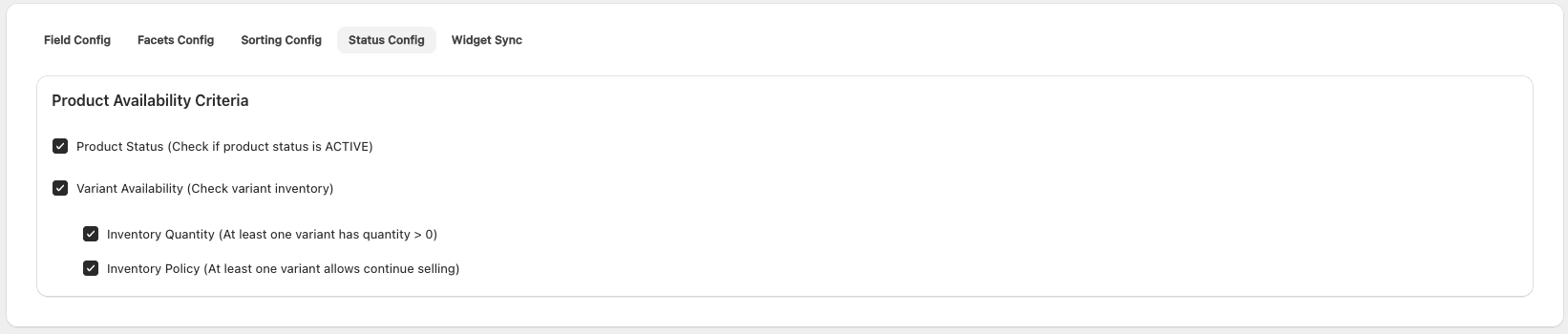
Product Availability Criteria
Standard Shopify Availability
By default, Shopify considers a product available if:
- Product status is
ACTIVE, AND - At least one variant meets inventory requirements:
- Variant has quantity > 0, OR
- Variant allows continue selling when out of stock
Customizable Criteria
The PA DiscoveryOS app allows you to customize these criteria through four configuration options:
| Configuration | Description | Default |
|---|---|---|
| Product Status | Check if product status is ACTIVE | Enabled |
| Inventory Quantity | At least one variant has quantity > 0 | Enabled |
| Inventory Policy | At least one variant allows continue selling | Enabled |
Updating Configuration
Making Changes
- Navigate to the Status Config tab
- Check or uncheck the desired options
- Changes are saved automatically
- A success message confirms the update
After Configuration Changes
Sync Required
After changing Status Configuration, you must perform a product sync to apply the new availability rules to your product catalog.
The sync process will:
- Re-evaluate all products against the new criteria
- Update availability status in the product index
- Ensure search results reflect the new rules